Budgeting and Saving Mobile Application
By Carly Burk
May 2024 – July 2024
Project Overview
The Product
A mobile application to teach users how to save and budget their funds.
The Problem
Saving and budgeting can be an overwhelming task, especially for first time earners. Without a proper foundation of knowledge and experience people create bad financial habits and debt.
The Goal
Teaching first time earners create healthy saving and budgeting habits from the start in an accessible way.
My Role
UX designer leading the app design
Responsibilities:
Conducted the user research and the competitive audit; created the paper and digital wireframe; conducted usability studies; created low fidelity and high fidelity prototypes
Understanding the User
User research
Most of the research I conducted was online, reading articles, and on chat sights.
I assumed the main reason was simply a lack of financial knowledge but I discovered there is a huge emotional aspect to saving and budgeting. That has a large impact on the youth’s mental health and there is a lot of shame around the subject. They also felt overwhelmed by the subject and that there was too much information, it is overwhelming without offering them a way to easily implement it.
I found that young adults who felt knowledgeable and had a budget experienced less negative mental health and worry. Also, those that tracked their spending felt more in control. Even if they didn’t earn as much as their peers.
Pain points
Mental health
Many youths feel overwhelmed by inflation, the rising cost of living coupled with lack of financial knowledge leaves them feeling overwhelmed and stuck. Offering a chat space to other users can help them feel less alone in the struggle.
Process
Many youths don’t have a good way to track their spending which makes it difficult to budget and leads to overspending. The app should be able to link to their account so it automatically tracks their spending.
Knowledge
Young people don’t have the knowledge and experience in managing finances, this is often their first pay check and struggle with paying “adult bills”. We should drip feed the informational content.
Putting it into practice
It is challenging to put into practice and make budgeting a habit. We should set reminders and notifications when they are close to their budget.
Persona - MAGGIE
Age: 21
Education: BA in Graphic Design
Hometown: Johannesburg
Family: Mom, dad, younger sister in high school
Occupation: entry level graphic designer
Goals
To properly manage her funds so she doesn’t need to constantly worry.
Frustrations
She doesn’t have the knowledge of how to budget and feels overwhelmed by the subject.
Living life to the fullest!
Problem statement:
Maggie is a young graphic designer trying to budget her pay check who needs it to be made simply and easy to manage because it is a new and overwhelming task.
Goal statement:
Our app will let users easily input their budget and manage spending which will affect young adults by saving them time and frustration of not having to do it through trial and error. We will measure effectiveness by the amount of users that finish setting up a budget.
User journey
The following picture describes the journey map of Kate. The present journey map was defined considering her average experience while buying clothing
ACTION | Look for places to purchase clothes | Choose which clothes to purchase | Add them to her cart and checkout | Pay and get them delivered | Receive items | Review |
TASK LIST | Tasks
A. Recognises she needs help budgeting B. identifies our app as helpful C. goes onto the site | Tasks
A. determines this site will help her B. creates a profile C. Enters her information and verifies her email | Tasks
A. Reads some basic information on budgeting B. Reads on the importance of saving C. Watches a short video on how to use the app effectively | Tasks
A. Choose to link her account or manually enter amounts B. Goes through the process of linking account OR C. Manually enters her information | Tasks
A. Receives a summary of the information to review B. Changes any wrong information C. Sets her budget and savings goals based on the information from the app | Tasks
A. Agrees to be notified if she is close to her spending limit |
FEELING ADJECTIVE |
|
|
|
|
|
|
IMPROVEMENT OPPORTUNITIES |
|
|
|
|
|
|
Paper wireframes
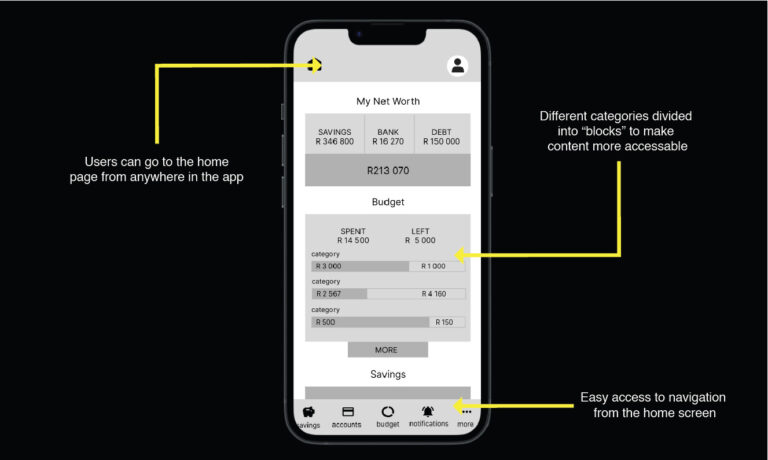
Next I sketched out the paper wireframes for my app, keeping in mind the navigation and user pain points. I wanted it to be very visual and highlight the products with easy navigation. I want it be be simple and easy to navigate and read all the information as there is a lot of it.
Digital wireframes
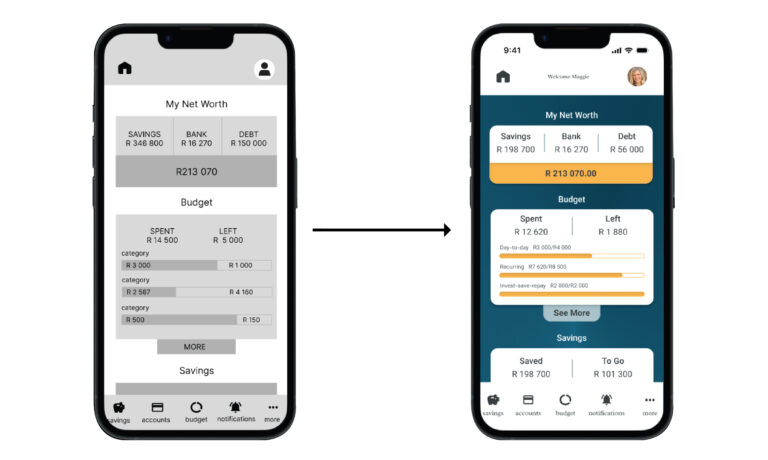
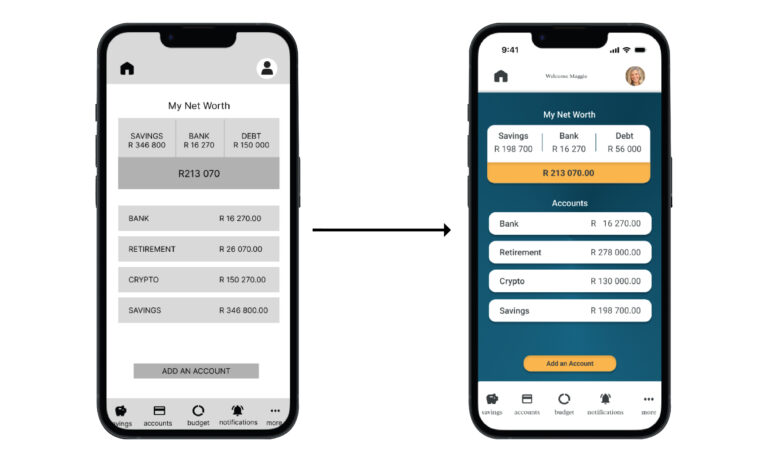
Moving from paper to digital wireframes made it easy to understand how the redesign could help address user pain points and improve the user experience.
Simplifying the information to make it easy to understand and get a concept of the users overall financial situation at a glance was a key part of my strategy.
Low-fidelity prototype
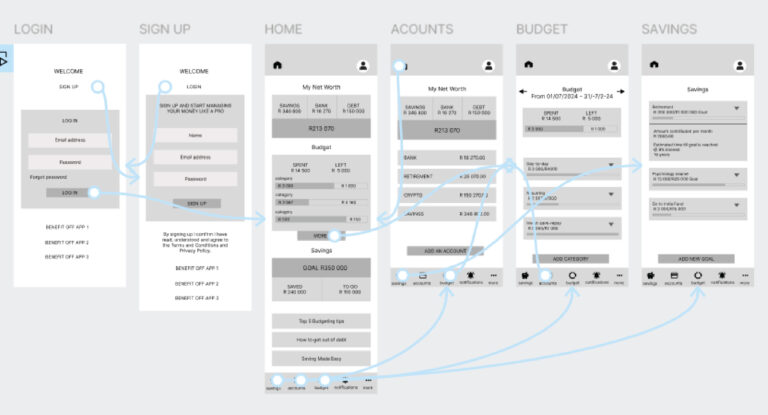
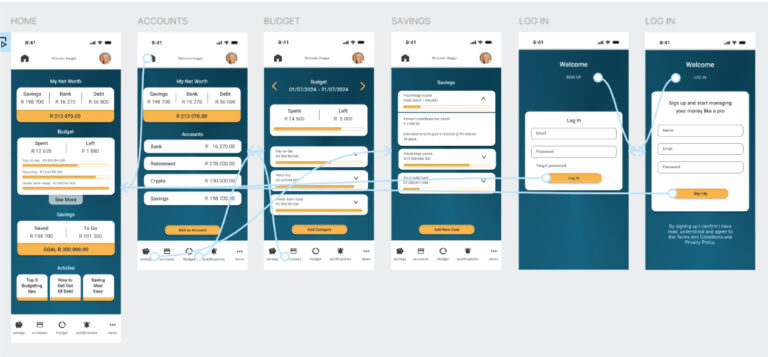
Once the app is downloaded you start on the sign up or log in page, once you have put in your details and verified your information you are taken to the home page.
From here you can see an overview of your finances, you can navigate to anywhere in the application from the home page.
You can play with it yourself.
Refining the Design
Mockups
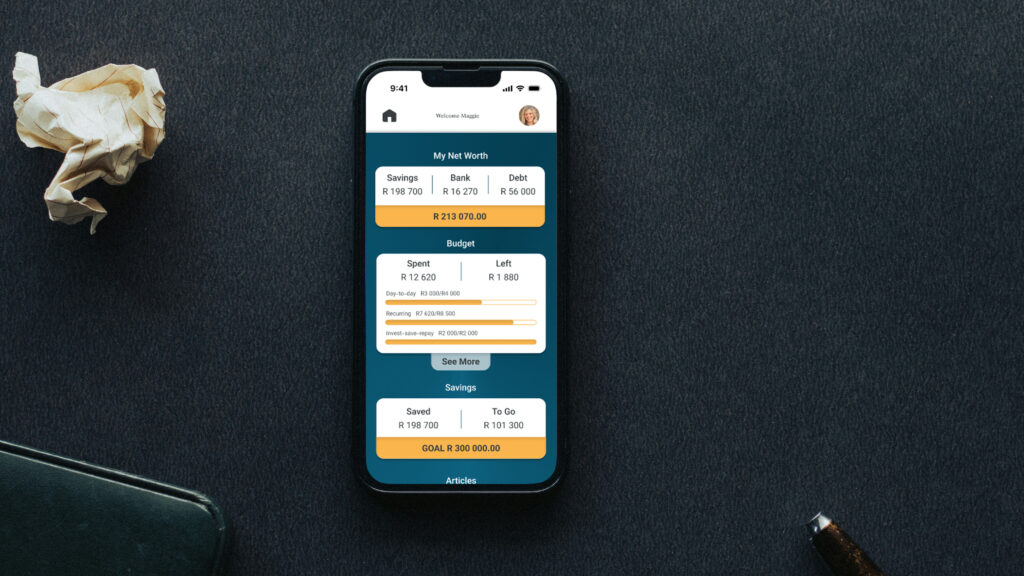
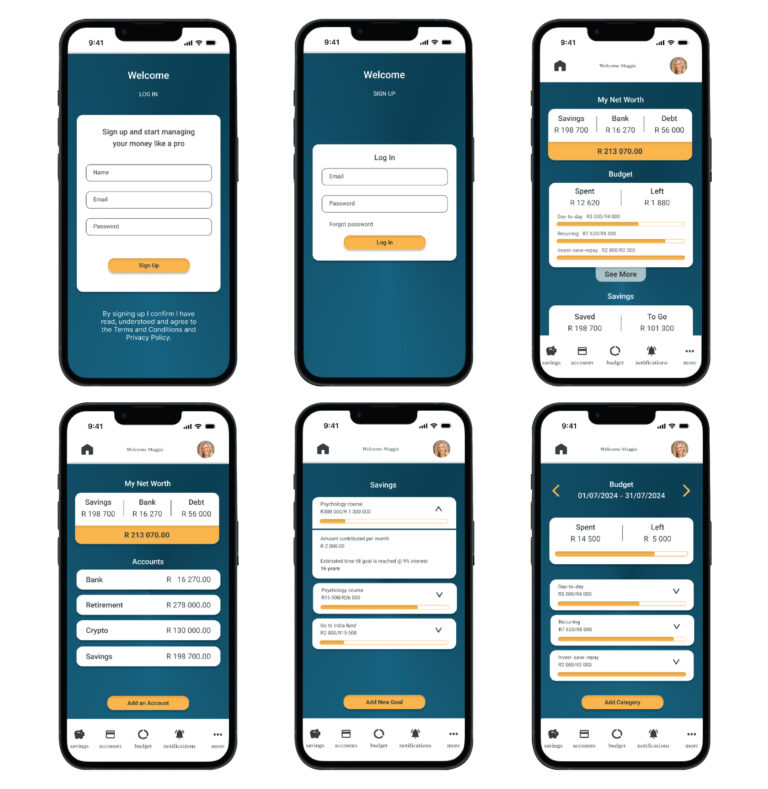
I went with a simple design, not wanting to overwhelm the user and focus on the information.
You can change the order on the home page so the main financial goal you are focusing is on the top.
The main pages and features of the application.
High-fidelity prototype
My hi-fi prototype followed the same user flow as the lo-fi prototype.
You can play with it yourself.
Accessibility considerations
I used a high-contrast colour on buttons and text so that it clearly stands out.
The application will have alt text available on each page for smooth screen reader access
I used shape and colour to differentiate buttons from the rest of the design clearly, and used clear, simple language to label them.
Going forward
Takeaways
Impact
the design is easy to navigate, the focus was on making complex information easy to access and understand.
What I learned
I learned the importance of hierarchy in information design, it can quickly get messy. The big takeaway for me is to always come back to the user in your ideation and designing.
Lets connect
Thank you for reviewing my work on the budgeting and saving app!
If you’d like to see more, or would like to get in touch, my contact information is provided below:
Email: carlym.burk@gmail.com